Step-by-step
Discover how to participate in a campaign. You can either follow this guide or watch the HuFi tutorial video on the official site.
Sign In#
Joining a campaign requires signing a message on‑chain and setting up API keys.
- Click Connect Wallet in the top‑right corner.
- Choose a provider and wallet, then connect.
- Your wallet address appears in the top‑right corner once connected.
- Open the dropdown and select Sign in.
- Sign the verification message (this proves you own the wallet).
Campaigns Discovery#
On the dashboard home page, the Only Active Campaigns filter is applied by default. Toggle the switch on the right side to view all campaigns.
Each campaign card includes the following information:
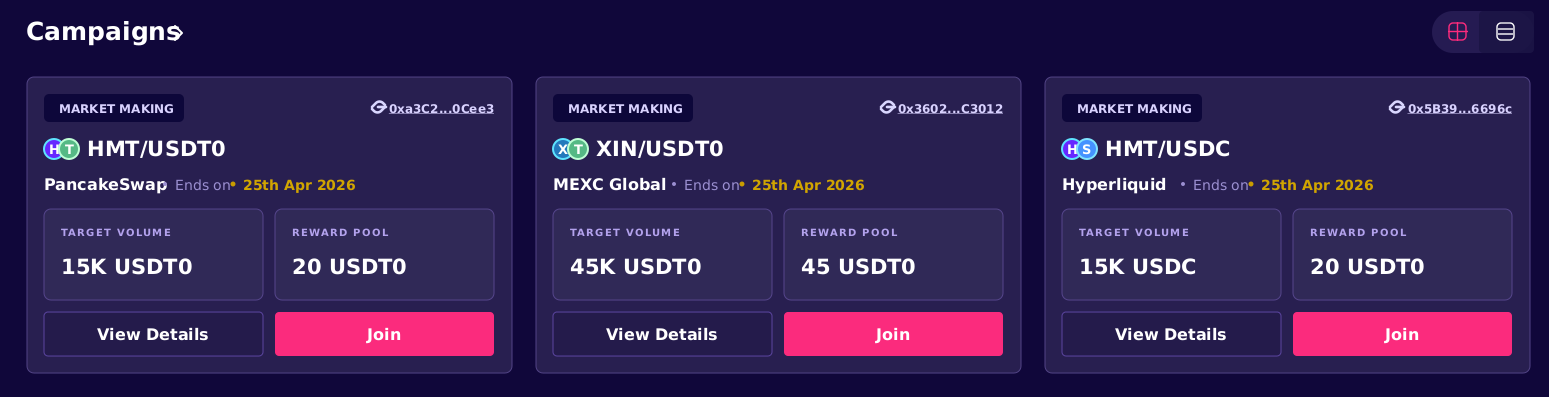
- Symbol – A token or pair of tokens involved in the campaign.
- Exchange – Where you need to operate.
- Type – Campaign type (Holding, Threshold or Market Making).
- Address – Smart‑contract address; you can inspect it on a blockchain explorer.
- End date – when the campaign ends.
- Target volume – The trading volume goal for the campaign.
- Reward pool – The amount allocated for campaign rewards.
Click View Details to open the campaign details.
To join a campaign, click Join. You might be prompted to enter your read-only API key for the exchange in case you join CEX campaign and don't have API key added for it yet, otherwise Join button is replaced by Registered to Campaign, indicating you are successfully registered.
To see campaigns you have joined, choose Joined Campaigns from the home page.
Trading#
After joining a campaign you need to trade on the specified exchange. Results are calculated daily and payouts occur each day.